Log in


LLM (openai/gpt-6.1-sol) summary:
- Death Investigation: otto faced a police investigation after his mother doria died in munich in june 2020
- Case Closed: authorities dropped the investigation in january 2021 after an autopsy found no conclusive evidence of unnatural death
- Targeting Graw: otto blamed forensic institute director matthias graw despite graw not personally performing the autopsy
- Plagiarism Allegations: stefan weber accused graw of copying his dissertation from a supposedly older book supplied through otto
- Forgery Discovered: university investigators questioned the book and subsequent checks identified modern typography and photography inconsistent with its claimed publication date
- Evidence Recovered: police found correspondence with a ghostwriter and printer while carbon dating established that the paper dated from 2015 or later
- Legal Outcome: following an initial prison sentence otto confessed in july 2026 and agreed to pay 210000 euros in damages while receiving a suspended sentence
- Continuing Consequences: weber withdrew his allegations and apologised while graw sought closure and otto planned a memorial dedicated to his mother
On a balmy, quiet evening in June 2020, Otto’s elderly mother, Doria, was fading in her Munich apartment. As she lay with her eyes closed, her pale face, framed by her white hair, was calm.
Otto, masked, gloved and draped in a sterile apron, dozed in a chair beside her. Otto, who sometimes goes by the name Rainer, and whose last name is only known as “Z” because of Germany’s strict privacy laws, was a doctor who had cared for his mother for years, ever since she had suffered a stroke and moved in with him. He described the course of that night to me. He woke to the sound of her short breath and tried to sit her upright. Her eyes were shut, and her lips pursed. She stopped breathing. Otto reached for his phone to call for help, but then Doria opened her eyes and stared into his. She smiled, drew one last deep breath, shut her eyes again, and lay still.
Otto sank into his chair. As a doctor, he had seen death many times, but his own mother’s passing sent him into shock. He felt frozen, watching the windows glisten in the fading light. He was 66, and his brother and father had died years before. He had no friends. He had given all of his time, energy and attention to his mother’s care, and now that his task was suddenly over, he had no one to turn to. He mourned in solitude, with an impromptu ritual. He lit candles and set metal plates at the four corners of her bed. He sat beside her and thought about her soul.
Once the rite was complete, Otto picked up the phone and called a funeral home. He knew the procedure: as a doctor, he could issue his own mother’s death certificate. After he hung up, Otto waited. It was the last calm moment he would experience for many months.
After he called the funeral home, Otto told me, he waited beside his mother all night and into the next afternoon before he heard a knock at the door. He was surprised to see that, rather than doctors, the two men in the hallway were police officers. They wore bulletproof vests and carried guns. He invited them inside, where they scanned the rooms. He directed them to his mother’s bedroom and followed close behind, but the officers stopped him and asked him to take a seat.
While the officers inspected his mother’s body, Otto sat in his office. Forty-five minutes passed, and then he heard someone else enter the flat without knocking. A tall, stylish woman approached and introduced herself as a coroner from the Munich Institute of Forensic Medicine, before walking off to the bedroom.
Otto knew that a coroner – as opposed to a doctor or nurse – is only sent to the scenes of suspicious deaths. He followed her to the bedroom, where she had begun inspecting his mother’s body. Otto wasn’t easily rattled, but he told me that the way the coroner handled Doria threw him off. He found her elegant attire unprofessional, given the circumstances, and her bedside manner lacking. He said that he tried, however, to remain polite and helpful. As she went about her work, he offered his recollections from his mother’s final hours and an account of her long illness, which he had documented minutely over the years. Otto informed the coroner that he was a doctor, but it seemed to him that she was uninterested. She turned to the police officers and, without explanation, told them that this was a matter for law enforcement, before leaving the flat. Otto told me he wondered why nobody was listening to him, the grieving son, the doctor?
More armed police officers arrived and searched the rooms. A commissioner approached Otto and told him to gather his things, as they needed to conduct their work uninterrupted. Sleep-deprived and grief-stricken, Otto was ushered on to the street and ordered not to return. He drifted along Munich’s wide, lamplit streets. As darkness fell upon the city, Otto told me he felt that he “didn’t understand the world any more”.
He checked into a hotel, but found it intolerable to sit in his room. Later that night he wandered back to his flat and found the door sealed with police tape. He was desperate to check in on his mother and thought she might still be inside. He broke the police seal and entered the dark rooms, which were a chaotic mess, as if burglars had turned it over before fleeing the scene. He entered the bedroom. His mother was gone.
Otto went back to his hotel but still found it impossible to sleep. He returned to his flat a second time at about 2am, and this time he found several police officers stationed there. They spotted him and put him in the back of a police car. He was taken to the Institute of Forensic Medicine, where doctors extracted samples from him: hair, urine and blood. When they had finished, Otto was taken back to the police station and found himself alone in what he described as a tiny, windowless cell with only a mattress, a stainless steel toilet and bars on the door.
The next morning, two officers questioned him. How did he care for Doria? Why did he document her condition so precisely? Had he given his mother a concentrated saline injection? Only then did Otto understand: the police believed he had murdered his mother.
After two nights in jail, or possibly three (his memory of this time is confused), Otto was released and allowed to return to his flat. While it was a relief to be home, he told me he still didn’t understand why he was under suspicion. He had not yet been formally charged with any crime. Otto wrote to the head of the Institute of Forensic Medicine, Prof Matthias Graw, to ask if his team had discovered anything suspicious while inspecting Doria’s body. Eager to prove his innocence, Otto offered to send Graw all of his day-to-day notes on Doria’s health. He suggested, boldly, that they co-author a paper about the cause of her death.
Graw never answered Otto’s emails, and Otto fell into a depression. He told me he began blaming himself for his mother’s death. Had he made a mistake? Overlooked some critical detail? Was there some way he could have saved her? Over the years, he said, he had taken her to see 19 different specialists to ensure that she received the best care. He made sure she exercised and spent time each day in the fresh air. He had tried his best, hadn’t he?
Doria was his whole world. Before the pandemic he used to take her into the city centre each night, where she was a favourite among the buskers for her generous tips. In her younger years, Doria had been an avid traveller, and Otto had taken her, in a wheelchair, on one last holiday to Italy. Now she was gone. Otto’s despair grew until he was unable to eat or sleep.
In January 2021, the authorities dropped their investigation into his mother’s death, and Otto was cleared of any wrongdoing. But he still couldn’t get over her death. He checked himself into a psychiatric treatment centre, hoping to quiet his mind.
Through therapy and exercise, Otto slowly regained his strength. Meanwhile, he had received a copy of the results of his mother’s toxicological report, signed by Graw and two of his institute’s specialists, but he was too disoriented to examine them carefully. Months passed. It was mid-summer, after Otto had moved back into his apartment, when he finally sat down with Doria’s medical files and the report.
With two PhDs and decades of experience in medicine and chemistry, Otto knew how to interpret lab reports. He told me that something seemed off. Data seemed to him to have been highlighted selectively. Other details seemed to him to have been glossed over. In the toxicological report, he said he spotted a chemical compound – commonly associated with exposure to cold – in her bloodstream. In his telling, an impossible, unspeakable idea crept into his mind: could his mother have somehow still been alive when she was taken away and stowed in the mortuary’s freezer? Could she have actually died at the Institute of Forensic Medicine, under the coroner’s care? And if so, how? The report also mentioned unusual traces of a substance contained in the autumn crocus flower, a poison called colchicine.
Otto began researching the Institute of Forensic Medicine. He started with its director, Prof Matthias Graw, and discovered that decades earlier, when Graw was a doctoral student at the University of Hamburg, he had written his dissertation on a certain naturally occurring poison found in the autumn crocus flower, called colchicine – the same poison found in Doria’s blood. Otto told me that a dark theory took shape in his mind: what if the institute had tried to frame him, to cover up the fact that they had actually killed his mother?
He did not go to the police – who, he reasoned, must work closely with the head of the institute of legal medicine. He would take the matter into his own hands. Hoping to perform his own examinations, Otto again wrote to the institute and requested access to his mother’s remains. Once more, his letter received no reply. In his apartment, hunched over his computer, Otto dug deeper into Graw, looking for evidence of negligence or criminality in the records of the man who oversaw his mother’s autopsy. He scoured scientific literature to research colchicine, the poison in which Graw was an expert.
By mid-February 2022, Otto had on his desk a book, dated 1982. Its title was Colchicine – 100 Years of Research. One of the chapters – its experiments, findings, tables and conclusion – was nearly identical to Graw’s dissertation, published five years later. Otto was convinced that he had in his hands the evidence he needed to bring Graw down.
At the end February 2022, a man named Stefan Weber was sitting in his office on the outskirts of Salzburg when an intriguing email landed in his inbox. The message claimed that Graw, the head of the Institute of Forensic Medicine at the University of Munich and one of the most respected forensic scientists in Germany, had plagiarised his doctoral thesis.
Stefan Weber, a plagiarism hunter. Photograph: Joachim Bergauer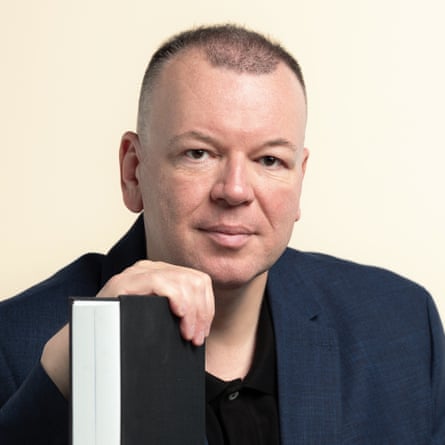
This was the kind of message Weber lived for. Fifty-six years old, baby-faced, broad, energetic and unrelentingly serious, Weber is the German-speaking world’s most-feared plagiarism hunter. His investigations have previously targeted Austria’s former labour and family minister Christine Aschbacher, who stepped down after Weber claimed her master’s thesis showed “never-before-seen depths of gobbledegook, nonsense and plagiarism”, and the German politician Annalena Baerbock, whose once-promising bid for the chancellorship was torpedoed when he investigated her book. The New York Times has called Weber the “undisputed terror of academics, politicians, [and] celebrities”.
Weber does not go out of his way to be liked. A former communications professor, he failed on eight occasions at eight universities to attain tenure. His colleagues in academia often found him brusque and inflexible. He told me he was hated because of his insistence on high standards.
Weber dresses in black and conducts his affairs with extreme scrupulousness. Fearing diabetes, he fasts for long periods. He spends his days in almost complete solitude, moving between his office, the library and the copy shop. He receives numerous requests for investigations each month, mostly from law firms and private individuals who want him to look into an applicant, competitor or colleague. Weber told me he charges up to €350 an hour for his work. He frequently pillories both public figures and obscure academics on his blog, where he also rails against “the Wokistan ideology” and has written: “Rightwing extremist must be understood as a title of honour!” In his spare time, he writes lofty books of philosophy and theory, with titles such as Language, Humanity, Universe.
The email, sent by one Otto Z, claimed that Graw’s entire career was “built on deception”. From Otto’s description, the colchicine book would have been an easy source to pilfer. It had been published in East Germany at the height of the cold war, which meant that it most likely wasn’t known to western academics when Graw published his dissertation. It was also, in plagiarism-hunter parlance, “grey literature”: informal material that isn’t peer-reviewed and therefore lies outside the reach of digital research platforms. Without Otto’s tip-off, it would have been impossible for Weber to discover the book’s existence.
Weber accepted the case and, with the help of an assistant, got to work researching the book. The archive of the East German publisher had been lost after reunification, and the book had never been cited by another source. Weber went searching for a physical copy. At the library, the elderly archivist told him they didn’t carry it. After consulting her databases, she informed him that no other library in the world did, either. But she found a single copy on eBay, for $220, and soon Weber held the book in his hands: a bright red hardcover. When Weber sat down to read it, he discovered that the red book told an incredible story nearly lost to history.
It was a record of an academic symposium held in 1981 at a hospital in the small Romanian city of Târgu Neamţ. Present were eminent experts on colchicine – biologists, pharmacists, zoologists – who gathered to present their work. Their lectures and conversations were assembled into chapters that chronicled the history of their niche field of research. Since at least the first century, the autumn crocus has been known to be toxic. Since the sixth century, the toxin responsible, colchicine, has been used to treat gout. Throughout the 20th century, new uses for colchicine were discovered: its ability to disrupt microtubules, for example, helps scientists study cell division, disease mechanisms and drug toxicity.
More surprising than any discovery presented at the symposium, however, was the guest list. Experts came from both sides of the iron curtain. At least two Americans were present: zoologist John Julius Biesele and obesity researcher Jules Hirsch. Had these westerners risked their reputations, careers and possibly their freedom to take part?
Perhaps the explanation had something to do with the symposium’s host, Elena Ceaușescu, the eccentric and ruthless wife of Nicolae Ceaușescu, then-dictator of Romania. Adding a bizarre twist to Weber’s investigation, Mrs Ceaușescu was, herself, an infamous academic cheat. Despite only completing elementary school, she believed that she was “born a great chemist”, and coerced the Polytechnic Institute in Bucharest into awarding her a PhD in chemistry. Throughout her husband’s reign, she forced Romanian chemists to produce work under her name. Had she somehow blackmailed western scientists into attending her conference? Or could they have been spies sent by the CIA to gather intelligence?
When Romania’s Soviet-backed regime collapsed in 1989, Elena Ceaușescu, along with her husband, was executed by firing squad. Weber’s research turned up no other references to her groundbreaking conference. By 2022, most of its attendants had also passed away. The conference seemed destined to remain a footnote in the history of science. But poring over the pages of Colchicine, Weber was soon convinced that one man had not overlooked the book: Matthias Graw.
After cross-referencing the red book and Graw’s dissertation, Weber and his assistant concluded that nearly 80% of Graw’s work was not original. Two of his thesis’s central chapters and many whole sections were word-for-word copies, with images and tables reproduced wholesale.
On 6 June 2022, Weber finally filed his report. In the 70-page document, which he sent to several media outlets, he claimed that Graw had plagiarised deliberately and with intent to deceive. “The case smells of severe scientific misconduct,” he declared in his blog. “The head of a forensic medicine institute … obviously has a corpse in the basement himself.”
Graw was on holiday in northern Norway when word reached him. On 20 June 2022, a reporter from the investigative magazine Der Spiegel contacted the University of Munich’s Institute of Forensic Medicine, asking if Graw would like to comment on allegations that he had plagiarised his thesis. Graw, a stern man of 66, told me through his lawyer that he remembered being baffled by the call. He explained that he had gone on holiday and left his laptop behind in Munich, about 1,500 miles away. Without it, he couldn’t possibly respond to each of the many accusations, which were anyway baseless. Soon after, the legal department of Graw’s employer, the University of Munich, called Graw to say that they could not support or represent him, as they had to maintain impartiality until the end of the investigation.
Der Spiegel broke the story on 1 July 2022 with an article headlined: “Serious plagiarism allegations against Munich forensic pathologist”. The Munich-based Süddeutsche Zeitung quoted Weber saying that Graw should be suspended while the allegations were investigated. Then came the tabloid Bild, which reported that several lawyers were calling for all the institute’s reports published under Graw’s directorship – thousands – to be reviewed, and the cases re-examined, potentially causing an “earthquake in the Munich judiciary”.
There were calls for Graw to resign. His underlings at the institute began speculating about his successor. The German government asked him to step down from his position as vice-president of the Society for Forensic Medicine. Finally, Graw’s alma mater, the University of Hamburg, opened an inquiry. If its investigation corroborated Weber’s report, Graw’s doctorate would be rescinded. He would lose his office, tenure and pension.
Prof Matthias Graw. Photograph: Fritz_Beck/Fritz Beck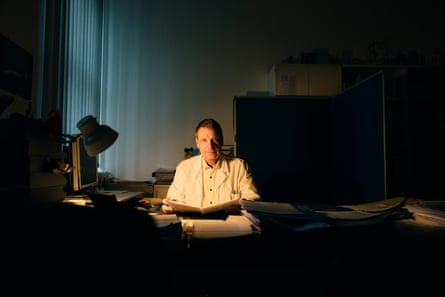
While Weber waited for the results of the Hamburg inquest, in late August he was surprised to read a follow-up story in Bild. Without alerting Weber, Otto had granted the paper an interview in which he claimed that Graw had stolen a gold tooth from his mother during the autopsy. In the article, Otto also claimed that his mother, Doria, was a Jewish Holocaust survivor – which immediately evoked a parallel between the gold tooth theft and the Nazi concentration camps. It was Weber’s policy never to investigate his clients’ motives. He was only interested in the truth, not in hearsay or petty grievances. But reading the article, he began to wonder whether Otto’s interest in Graw might go beyond academic integrity.
Three months after opening their investigation, the University of Hamburg’s panel of ombudsmen finished their internal inquiry. Graw’s detractors expected his disgrace to be complete. But the story was to take a new, unexpected twist.
The university team did not agree with the conclusions of Weber’s report accusing Graw of plagiarism. In fact, they pointed the finger in an entirely new direction. In the university’s view, it wasn’t Graw’s dissertation that was fraudulent. The panel had examined the red book on colchicine, which Graw had supposedly plagiarised for his thesis. And in their expert opinion, it was the red book that was fake.
Weber was stunned. He began looking into the university inquiry’s claims. First, it stated that the publisher’s address listed on the copyright page didn’t correspond to any real location in the former German Democratic Republic. Second, a certain technical term was translated awkwardly into English. And third, the text cited a 1983 source, which was impossible for a book printed in 1982 and based on a 1981 conference.
This evidence struck Weber as weak. It could all be the result of sloppy socialist-era publishing, rather than proof of a forgery. And why would anyone go to such lengths to destroy Graw’s reputation as to create an entirely fake book with such an elaborate backstory?
Still, Weber felt his abilities as an investigator had been called into question, and he set out to crush the accusations. He began by contacting Otto, who had first sent him a pdf scan of the red book, before Weber’s librarian found a print copy on sale on eBay. He asked where exactly he had first found the red book. Previously, Otto had explained that he had seen it cited in a patent, then happened upon the volume he had in his possession at a Serbian flea market. Weber asked, which flea market? And could he provide the patent where it was cited?
Otto, who had previously been helpful in all of his interactions with Weber, became evasive, then angry. Without answering Weber’s questions, he insisted that the University of Hamburg had performed a sham investigation designed to clear Graw’s name. Then, turning conspiratorial, he flooded Weber’s inbox with hundreds of pages of documents chronicling his mother’s death and his reasons for believing that Graw had mishandled her remains.
Weber tried to make sense of Otto’s behaviour by working through the twists in the story on his blog. “If [this is a] forgery, then all this is as unlikely as researchers finding out tomorrow that the Earth is flat,” he wrote on 6 October 2022. Weber saw only two options: either the academic elite had conspired to protect Graw by conducting a shoddy investigation, or Otto had forged the book with the intention of using Weber as a pawn in a shockingly elaborate scheme to sabotage Graw. He announced that if the latter was true, he would renounce plagiarism hunting for ever.
Weber cleared his schedule and turned his attention to the red book. He looked through old GDR phone books for the name of the translator – but no person under that name seemed to live in East Berlin at the time. Weber brought the book to an antiquarian, who claimed that the volume’s cloth bookmark was unusual for that era of East German publishing. A graphic designer informed him that the book’s primary font, Scotch Modern, was only released in 2008. Finally, Weber tracked down the photographer responsible for a key photo of the autumn crocus, who told him that he had uploaded the picture to Wikimedia Commons in 2005.
Weber realised he had been duped. On 13 October, he publicly apologised and revoked his accusations against Graw in a blog post that called the affair “a disaster for plagiarism research”. Then, in a new blog post titled Chronology of a Failed Character Assassination, he set out to document how the book had been produced.
Graw was perfectly sure he had not copied his PhD dissertation, but in a recent phone call, he told me how unsettling the accusations had been: “One thing was clear: the plagiarism hunters had been commissioned by someone, but the question was who, and why?” He spent months trying to calm people in his circles, convincing them he’d done nothing wrong. When he received a pdf of the red book he was supposed to have plagiarised, he was struck by how many glaring errors it contained – and how many people had overlooked them.
During this time, Otto had initiated a series of civil proceedings against Graw, accusing him of copyright infringement. In August 2022, Graw read the interview with Otto in Bild, in which Otto further accused him of stealing a gold tooth from his dead mother. It was then he realised that Otto, the bereaved son, was behind the plot to destroy his career. In October, Graw filed a criminal complaint against Otto, asking for a police investigation of the whole affair.
On 8 November 2022, police burst into Otto’s apartment. Officers found extensive literature on colchicine and several of Graw’s scientific papers. They seized correspondence and data-storage devices containing sprawling documents in which the name “Graw” appeared more than 28,000 times. Otto’s laptop contained folders named Graw and Dissertation, and images of the autumn crocus flower. Investigators also found correspondence with a Pakistani ghostwriter and a contract with a Serbian printer. Out of these disparate ingredients, it seemed, Otto had carefully assembled the red book.
As investigators pored over Otto’s records, a picture emerged of his past, his mother’s final days and his strange, obsessive quest for revenge. Though he had lied about practically everything else, Otto was, in fact, a doctor – albeit one with a chequered clinical history. After practising in the US, Switzerland and Germany, he settled in the UK, but concerns raised by a pharmacist about “bizarre” prescriptions he’d written had prompted a review by Lambeth primary care trust and an investigation by the General Medical Council. In 2010, he had been barred from practising medicine in the UK, but by then, he had returned to Munich to focus on just one patient: his mother.
Otto believed that movement was key to improving Doria’s health. He insisted that Doria walk every day, even when she was so exhausted she could barely get out of bed. He brought her down into the streets and observed as she hobbled along the pavement. He told me that he would leave marks on the buildings to track her progress, and took her to her favourite park bench. “Come on, Ma!” he remembered saying to cheer her on. “Just another three metres!”
For years, he monitored her day and night, noting signs of progress or deterioration. Every day, he inspected her urine and weighed her faeces to make sure she was getting enough nutrition.
After Doria died, Otto called the funeral home, asking for her to be picked up as late as legally possible, 36 hours after her death. When the company asked for a death certificate, Otto issued one himself, noting “rigor mortis” as a sign of death. It was then that the funeral company got suspicious and alerted the police, who sent a patrol unit and a coroner.
When the coroner arrived, Otto’s erratic behaviour and desire to share his copious records of his mother’s health made her suspicious, too. “Extremely odd behaviour of the son; questionable medical treatment; extremely poor condition of care,” she noted in her report. Noting “indications of an unnatural death”, she ordered an autopsy. The examiners’ prevailing theory was that Otto had accidentally killed his mother with an overdose of insulin, then covered up his mistake by administering a glucose injection to stabilise her vitals.
In the weeks after the coroner issued her report, Otto launched legal action against her, including for invoicing irregularities, but his suit was dismissed. Police opened a manslaughter investigation against Otto for the death of his mother, but dropped the case after the autopsy. Graw told me he didn’t perform the autopsy himself. His name was on the report merely as the institute’s director. The report found no conclusive evidence that Doria’s death was unnatural.
During those long, uncertain months, Otto became tormented by trying to recover his mother’s corpse and discovering the exact cause of death – wondering whether it was due to a mistake he had made. He wrote to Matthias Graw to suggest they co-author a paper on the conditions that led to Doria’s passing, and recommended they perform a histological examination of the brain, which he later described in court as entailing “a circular cut with a butcher’s knife, then pulling the skin off and going at it with a saw”.
Graw said he never received the letter, but if he had, he wouldn’t have responded to Otto for the same reason that Otto was kept in the dark about the examinations of his mother’s body – the ongoing criminal investigation forbade any contact with a suspect. Otto seems to have become obsessed with Graw, the keeper of his mother’s remains, and his fixation gradually twisted into a conviction that he was hiding something sinister.
Barred access to Graw, Otto sought to learn everything he could about the man and find a fatal flaw. He fixated on Graw’s dissertation on the poison colchicine, hoping to undermine the foundation of the doctor’s entire career. He launched a flurry of bizarre proceedings against him, claiming that the doctor had failed to recognise inconsistencies in the colchicine levels in his mother’s blood, and accusing him of using the “flesh of the Jewish woman Mrs Z” for experiments.
On 1 March 2024, the Munich public prosecutor concluded its investigation and charged Otto with document forgery, copyright infringement and multiple counts of defamation and fraud. The case came to trial in early 2025. The prosecution argued that Otto had attempted to “completely obliterate the livelihood” of Graw by commissioning the creation of the red book, inventing the 1981 conference on which it was based, and listing the book on eBay in order to fool Stefan Weber into carrying out his plan. Carbon dating corroborated these claims – the paper on which the book was printed was produced no earlier than 2015. When the furore failed to cost Graw his job, the prosecution claimed, Otto had fed the press the gold tooth accusation.
Otto (centre) in court with two of his lawyers. Photograph: Dpa Picture Alliance/Alamy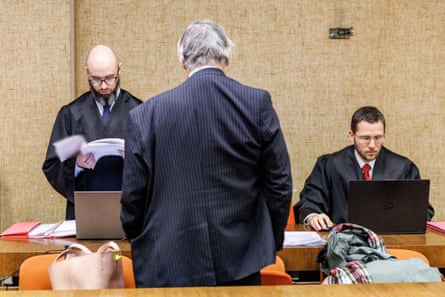
During the trial, Otto repeatedly claimed that his mother was a Holocaust survivor. Reporters for Die Zeit, the weekly magazine that published an extensive article on the case, contacted the main organisations that document survivors, and concluded that her name does not appear in the records.
On 6 March 2025, Otto was sentenced to two and a half years in prison. The court cited his “almost unprecedented criminal energy”. Otto appealed against the court’s decision. When convicted, he was offered a suspended sentence if he confessed, but he maintained his innocence, claiming he and his mother were the victims of a string of bureaucratic errors, then a conspiracy to cover them up. Finally, in July 2026, he confessed to commissioning the red book and agreed to pay €210,000 in damages to Graw. He received a two-year suspended sentence.
When I spoke to Graw recently, he told me he was satisfied with the outcome and hoped for peace and quiet now. But he was still coming to terms with the case, which had consumed the past few years of his life. He remained baffled by Otto’s motive in targeting him – he hadn’t performed the autopsy or started the investigation, and his institute’s report was the reason why Otto had been exonerated. He lamented that Otto had never explained, or apologised.
He complained that “some of the media had no interest in investigating the allegations and carried stories before giving me a chance to respond”. And while, as a scientist, he was bound to test hypotheses before publishing them, “plagiarism hunters didn’t even check whether the source was genuine at all”. (Despite his vow, Stefan Weber has not retired from plagiarism hunting, but he has sworn to never again work with “grey literature”.)
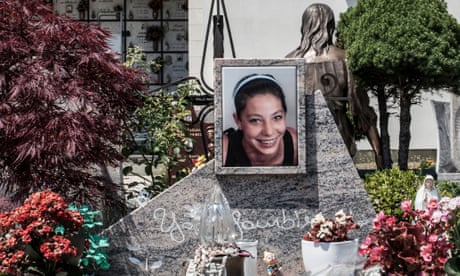
At trial, questions were raised about Otto’s mental health, but he refused to submit to psychiatric evaluation. According to experts called by the court, the assiduous attention to detail with which he carried out his forgery seems to rule out a full psychotic breakdown or a schizophrenic episode, but he may have experienced temporary delusions brought on by grief.
Otto dismisses mental illness allegations as attempts to discredit him. He told me he has bought a house in Serbia to transform it into a memorial dedicated to his mother. With the slow, reverent precision with which he does everything, he has been attempting to retrace the steps of Doria’s entire life. In this memorial exhibition, he said, he will show she was a Holocaust survivor, and detail the true sequence of events that led to her death.
This article is a collaboration with Epic magazine
Listen to our podcasts here and sign up to the long read weekly email here.

 China
China

 2040
2040

 2050
2050

 2060
2060